[ ← blog / drush ](/) Jan 23, 2022 · \#drush · 5 min read
# Auto discovery of global commands in Drush
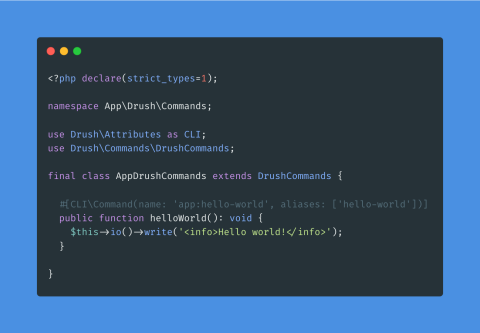
This blog post is about the auto-discovery of global Drush commands. To be honest, I have no idea what a global command is or means and how it differentiates between a site command. However, I find the global-command discovery feature fascinating and a streamlined developer experience when writing commands for your Drupal site. **Note: this feature is available in Drush 10.5+ or 11.0+.**
Some Drush commands can already be auto-discovered. Those are site-wide commands. Site-wide Drush commands exist in your Drupal codebase's drush/Commands directory and use the `Drush\Commands` namespace.
I am working on a new Drupal book and dove into a section that discussed writing Drush commands for your Drupal module. While Drush provides a command to generate Drush commands, I wanted to brush up on the manual steps and help explain the generated code. That's when I saw the section on [auto-discovered commands](https://www.drush.org/latest/commands/#auto-discovered-commands).
Drush global commands can be auto-discovered if they meet the following conditions:
- The command is in a class that is PSR-4 auto-loadable
- The namespace for the command class contains `Drush\Commands`. So `App\Drush\Commands` would be a viable namespace.
- The command class ends with `DrushCommands`. So the filename would be `AppDrushCommands` or `FooDrushCommands`, etc.
Personal note: I find the file naming requirement a bit redundant since we already have a specific namespace, and the class is inspected to ensure it isn't abstract, an interface, and is a subclass of `Drush\Commands\DrushCommands`.
This is accomplished with `Robo\ClassDiscovery\RelativeNamespaceDiscovery`. The [relative namespace discovery class](https://github.com/consolidation/robo/blob/3.x/src/ClassDiscovery/RelativeNamespaceDiscovery.php) inspects the known namespaces in the class autoload. Given an expected relative namespace (`Drush\Commands`) and a file matching pattern (`*DrushCommands.php`), it will return available classes that have been discovered.
Here is a copy of the code from Drush ([Application.php#L393-L407](https://github.com/drush-ops/drush/blob/6a9187f944be0c7d29ae4407e2ea572bda598fe9/src/Application.php#L393-L407)):
```php
/**
* Discovers commands that are PSR4 auto-loaded.
*/
protected function discoverPsr4Commands(ClassLoader $classLoader): array
{
$classes = (new RelativeNamespaceDiscovery($classLoader))
->setRelativeNamespace('Drush\Commands')
->setSearchPattern('/.*DrushCommands\.php$/')
->getClasses();
return array_filter($classes, function (string $class): bool {
$reflectionClass = new \ReflectionClass($class);
return $reflectionClass->isSubclassOf(DrushCommands::class)
&& !$reflectionClass->isAbstract()
&& !$reflectionClass->isInterface()
&& !$reflectionClass->isTrait();
});
}
```
I found this useful as I have been trying some *really* hacky things with Drupal by giving myself Drupal codebase a root `App` namespace. My `composer.json` looks like this:
```json
"require": {
"php": "^8.0",
"composer/installers": "^1.9",
"drupal/core-composer-scaffold": "^9.3",
"drupal/core-project-message": "^9.3",
"drupal/core-recommended": "^9.3",
"drush/drush": "^11.0",
"vlucas/phpdotenv": "^5.4"
},
"autoload": {
"psr-4": {
"App\\": "app",
},
"files": ["bootstrap.php"]
},
```
Given this autoload definition, I can create the directory `app/Drush/Commands` to hold my Drush global command files, like `AppDrushCommands.php`:
```php
io()->writeln('Hello world!');
}
}
```
You may notice I am using PHP 8 attributes and named parameters to define my commands instead of annotations. That's a follow-up blog post I will be working on. PHP 8 is *fantastic*.
Now, when running `php vendor/bin/drush,` the `app:hello-world` command is available.
```
$ php vendor/bin/drush app:hello-world
Hello world!
```
The one thing I love about providing commands via a module is that we can provide dependency injection. As far as I am aware, there is no way to handle dependency injection. That means you will interact with Drupal using the static `\Drupal` class and access services via `\Drupal::service`.
That means you should also define the bootstrap level required to run your global command. For instance, the `CacheCommands` provided by Drush declares its needs a full bootstrap of Drupal. The concept of Drupal bootstrapping is documented very well on the Drush project website: . Drupal module commands are always run at `full`.
A global command with a full bootstrap to access data from Drupal would look like the following:
```php
#[CLI\Command(name: 'app:entity-types')]
#[CLI\Bootstrap(level: DrupalBootLevels::FULL)]
public function getEntityTypes(): void {
$entity_type_manager = \Drupal::entityTypeManager();
foreach ($entity_type_manager->getDefinitions() as $definition) {
$this->io()->writeln(sprintf(
"%s: %s",
$definition->id(),
$definition->getLabel()
));
}
}
```
If we did not specify the bootstrap level we would get the following error:
```
$ php vendor/bin/drush app:entity-types
In Drupal.php line 170:
\Drupal::$container is not initialized yet. \Drupal::setContainer() must be called with a real container.
```
But with the bootstrap level defined, we get a list of entity types!
```
$ php vendor/bin/drush app:entity-types
block: Block
block_content: Custom block
block_content_type: Custom block type
comment_type: Comment type
comment: Comment
contact_form: Contact form
contact_message: Contact message
editor: Text Editor
```
The one practical benefit I see is not having to create packages of the type `drupal-drush` so that packages get installed to a proper directory. Now your third-party Drush commands can live in the `vendor` directory and not `drush/Commands`.
Thanks for reading
I write about Drupal, PHP, and the quiet infrastructure behind large sites — caching, config, and testing. New posts land every week or two.
[Subscribe via RSS →](/rss.xml) [About me →](/about-me)
[← Older
hook_update_N or hook_post_update_NAME
](/blog/hookupdaten-or-hookpostupdatename) [Newer →
Writing Drush commands with PHP attributes
](/blog/writing-drush-commands-php-attributes)